Browsing "Older Posts"

Browsing Category "BlackBerry"

BlackBerry Torch 9800 disadvantages

By Moonlight → الأربعاء، 29 يونيو 2011
Introduction


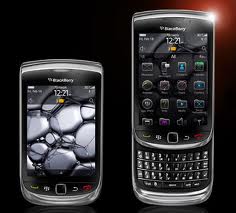
The BlackBerry Torch is not the first phone to give you both a full hardware QWERTY keyboard and an ample touchscreen in a smartphone setting. But it’s a debut for BlackBerry and one that will probably shape the future for the next generation of RIM phones. The supplied 6th version of the BlackBerry OS is looking to balance user-friendliness and performance, tradition and creativity in the latest BlackBerry touch products..
The BlackBerry Torch 9800 is the usual impressively built gadget, the ultimate email machine.
One would think RIM is among the lucky few phone makers that could’ve for ever pretended the iPhone didn’t exist. When your devices are in a class of their own and you’re a household name in corporate services, it’s easy to believe you’re special.


But RIM is not looking for safety in habit. We’ve seen enough proof that complacency is not on the company’s agenda. And they deserve credit for that. RIM still put business users first but the game has changed and they know it. So, a first-ever slider and a new OS are the torchbearer for RIM looking to revise their whole strategy.

Key features

·    Quad-band GSM/GPRS/EDGE


·    3G with HSPA support


·    3.2" 16M-color multi-touch capacitive touchscreen of 360 x 480 pixel resolution
·    5 MP autofocus camera with LED flash and VGA video recording


·    BlackBerry OS 6


·    Wi-Fi 802.11 b/g/n


·    Built-in GPS with BlackBerry maps preloaded


·    4 GB internal storage and a hot-swappable microSD card slot


·    Nice design and build quality


·    3.5mm standard audio jack


·    Accelerometer sensor for screen auto-rotate


·    Bluetooth v2.1 and microUSB v2.0


·    Document viewer


·    Optical trackpad


·    Good audio quality


·    DivX and XviD support

Main disadvantages:

·    Comes pricey


·    No document editing without a paid upgrade


·    Interface needs more polishing


·    No FM radio


·    No web browser Flash support


·    No dedicated video-call camera


·    No email support or BlackBerry maps without BlackBerry Internet Service account


·    Loudspeaker way too quiet


The BlackBerry Torch 9800 is meant to appeal to the average Joe while making sure the typical corporate user receives the usual high quality service. Wait a minute. Since when are they even remotely interested in the average Joe? Now, that’s what this whole thing is all about. With touchscreen, app stores and the growing smartphone market share, the typical mobile phone user is not what they used to be.


RIM not only makes phones – it’s a service provider. But that has changed too. People are no longer simply offered a piece of hardware – they get online services by others too – Ovi, Google or else.
That’s the new reality RIM know they need to adjust to. Keeping up with an evolving market without losing their identity is not an easy thing to do. At least the Torch 9800 isn’t their first try. The clickable SurePress touchscreen didn’t quite make the splash it was supposed to. But they stood by it and tried to make it better.
It’s now up to the Torch to show to the world that RIM can make touchscreen and QWERTY work together in a BlackBerry set and in BlackBerry fashion

BlackBerry Storm2 9520 disadvantages

By Moonlight →

Introduction
RIM are a company with style and simply hopping on the touchscreen bandwagon with another iPhone wannabe just wouldn't suit them. They certainly realized the importance of having a full-touch device in their portfolio but wanted a clear and legible BlackBerry imprint on it.


The BlackBerry Storm 9500 was a truly intriguing device but never really managed to find its place in the new market it was built for. Too bold and unusual for the BlackBerry-loyals and yet too conservative for the rest of the world, it didn't quite get the results it was hoping for. But the successor might use the publicity the first Storm generated for its own good.


Key features

·    Quad-band GSM/GPRS/EDGE and 2100 MHz 3G with HSPA support


·    3.25" 65K-color capacitive touchscreen of 360 x 480 pixel resolution


·    Improved touchscreen experience with piezo-electric touch feedback system


·    3.15 MP autofocus camera, LED flash


·    BlackBerry OS 5


·    Wi-Fi and built-in GPS with BlackBerry maps preloaded


·    2 GB internal storage and a hot-swappable microSD card slot


·    Landscape on-screen keyboard is as close to hardware keys as we have seen on a touch phone


·    Nice looks and great build quality


·    3.5mm standard audio jack


·    Accelerometer sensor for screen auto-rotate


·    Bluetooth v2.1 and USB v2.0


·    Document editor


·    Good audio quality

Main disadvantages:

·    No email support without BlackBerry Internet Service account


·    Interface not as quick as competitors'


·    Chubbier than most touchscreen phones with similarly-sized displays


·    Mediocre camera


·    No FM radio


·    No web browser Flash support


·    No dedicated video-call camera

The good news is RIM decided to honor the Storm2 with a few upgrades over the original. However, none of them seems to be absolutely crucial so the greatest responsibility falls on the brand new piezo-electric touchscreen. The missing link between touchscreen and a hardware keypad is what many keen texters must have been waiting for. Or at least that's what RIM believe.

Now, the SurePress screen didn't work out particularly well on the first Storm and a second failure might herald the demise of the entire series. So the BlackBerry Storm2 knows it needs to impress the audience or it might take a spot in history for all the wrong reasons.
But first thing first, let's check out what you get when you buy a shiny new Storm2. Unboxing follows after the break.

BlackBerry Pearl 3G 9105 disadvantages

By Moonlight →
Introduction

Berries have been changing – in small steps, and big leaps. Sometimes stumbling, other times graceful and assertive. It seems the time was finally right for the Pearls’ makeover too.
It’s been almost three years since the last of the Pearls. But if you wanna know what kept RIM busy all that time you’ll have to look up the Storm and the Torch. Touchscreen or the highway wasn’t a choice RIM wanted to make but had to.
To be honest, Pearl is not nearly exciting as the Storm, the Bold or the Torch. Bringing the budget lineup up to date is not the best job RIM have had to offer lately. But whoever got assigned to it did well. Better perhaps than they thought they would. Three years is a long time. Long enough for people to start thinking you’ve given up. Long enough for RIM to know they couldn’t afford to mess this launch up. And luckily, the BlackBerry Pearl 3G is right on the money, reviving a famous messenger family.
The BlackBerry Pearl 3G 9105 is the upgrader’s dream come true. A bigger and better display: check. Upgraded camera: check. Premium connectivity: check. Faster processor: check. Slim and sexy: check. We wish it were that simple.

Key features

·    Quad-band GSM support


·    Tri-band UMTS support with HSDPA (3.6Mbps)


·    2.25" 256K-color TFT display of 360x400 pixel resolution


·    624MHz CPU


·    Wi-Fi connectivity


·    Built-in GPS receiver with A-GPS support


·    3.15 megapixel auto-focus camera with geotagging, LED flash


·    Hot-swappable microSD card slot (up to 32GB), 2GB card included


·    Dedicated music keys


·    3.5 mm audio jack


·    Excellent audio quality


·    Optical trackpad navigation 
.  BlackBerry OS v5.0 with an official upgrade roadmap to OS 6


·    Nice web browser


·    Office document editor


·    Smart dialing


·    DivX and XviD video support

Main disadvantages

·    No email support or BlackBerry maps without a BlackBerry Internet Service account (plan)


·    BlackBerry OS v 5.0 offers basic text-only submenus


·    No FM radio


·    No front facing video-call camera


·    Glossy front is a fingerprint magnet


Let’s say it again – it’s the budget lineup. Not the A team. Simple, compact candybars with little to no fancy features and certainly no fancy finish. That’s what used to make a BlackBerry Pearl. But… well… the berries have been changing.
As of late, RIM are trying to shake off their uptight image and the Pearl lineup is obviously part of that transformation too. In the Storm series and the Torch, touchscreen makes a lot more difference of course. The Pearl lineup has its own way of breaking the rules.
Traditionally, BlackBerry Pearl phones come with a hybrid QWERTY keyboard. New Pearl is not afraid to offer a new set of users a choice. It comes in two flavors: a trademark half-QWERTY keyboard on the Pearl 3G 9100 and a regular numpad on the 3G 9105. These are otherwise two identical handsets.
The Pearl 3G overwhelmingly upgrades the original Pearl series. That’s one thing the users will appreciate most. But BlackBerry is looking to reach out to new customers too and the two different keypads do seem to make sense. It’s almost as simple as a hybrid SureType keyboard for the BlackBerry faithful and a regular numpad for the newcomers.
It’s hard to please all really and we don’t know yet if the Pearl 3G 9105 will justify all the expectation. It just seems though it can’t be another easily forgotten sequel. For anyone coming from any of the older Pearls it’s an out-and-out upgrade – and an eagerly awaited one too. But isn’t it just a bit too bold, too disrespectful of tradition?
We’re looking at the first BlackBerry phone EVER to come with a regular numpad. Even the Pearl Flip 8220 didn’t dare to be different all the way. So ultimately, the question is who the Pearl 3G 9105 is for. We don’t pretend to have all the answers but we’re eager to look for them in the following review.

BlackBerry Curve 8520 disadvantages

By Moonlight →
Introduction

With the Bold almost reaching perfection in the BlackBerry arts, new horizons need to be explored to keep the spark alive. The tall task to pioneer new territories (in BlackBerry terms anyway) falls on to the Curve 8520.


The new Curve has a price tag that's easier on the wallet and - coming from a BlackBerry - that's a welcome change of game plan already. But what makes this here Berry a shocker is… wait for it… music keys. Last time we checked features like that were teen geek stuff and we don't know many teens are walking around with a BlackBerry in their pocket. Well, it's certainly going to be interesting to see how BlackBerry's attempt to woo this new demographic will turn out.

Key features


·    2.46" 65K-color TFT landscape display of QVGA resolution


·    Comfortable four-row full QWERTY keyboard


·    Quad-band GSM support, Wi-Fi connectivity


·    2 megapixel camera with fixed focus


·    512MHz CPU


·    BlackBerry OS v4.6 with responsive trackpad navigation


·    Hot-swappable microSD card slot (up to 16GB)


·    3.5 mm audio jack


·    Decent audio quality


·    Nice web browser


·    Office document editor


·    Smart dialing


·    Dedicated music keys


·    DivX and XviD video support

Main disadvantages

·    Many features are unusable without a BlackBerry Internet Service account (plan)


·    BlackBerry OS offers basic text-only submenus


·    Mediocre camera performance and features


·    No FM radio


·    No 3G support


·    No TV-out functionality


·    Music keys are stiff and unresponsive


·    No built-in GPS receiver


·    Back panel is a fingerprint magnet

Most of the software-related shortfalls in the list above are shared by all other BlackBerries out there. The hardware disadvantages boil down to features that the 8520 needed to skip to fit budget. After all, the fancy stuff is in the more expensive 8900 Curve and 9700 Bold. So if you're already ok with the 8520 Curve specs and you want to go for a BlackBerry device and service, you won't find anything substantial to complain about here.
Obviously it took a few sacrifices for the Curve 8520 to keep that price tag within limits. The magnificent screen was ruthlessly trimmed down to the run-of-the-mill QVGA resolution. On a second thought though, that only puts it on a par with the screens on the Nokia E71 and E72 and we don't see anyone complaining about them.


But how Blackberry and other makers define cheap are completely different things, so a commitment-free 8520 Curve fetches nearly the same as a Nokia E71. Now, that can't be too good for the BlackBerry, right - especially now that Nokia are offering their paid Push Messaging service in quite a lot of countries.
As we see it, the only way for the Curve 8520 to escape constant comparisons to its Nokia counterparts is to find some way to appeal to a wider market.
But frankly, we're a little skeptical whether one handset can convince the masses that BlackBerries are now as much about pleasure as they are about business. RIM have built a reputation on churning out no-nonsense corporate phones and it will take several more generations (and frankly, optimizations) for people to start seeing the company differently.

BlackBerry Bold 9780 disadvantages

By Moonlight → الثلاثاء، 28 يونيو 2011
Introduction

It’s no surprise that the BlackBerry Bold 9780 is the next logical evolutionary step, rather than a complete makeover that will propel it into the same league as the iPhone and Android. RIM has a loyal core of customers whose bond with the brand goes beyond the obvious business benefits. And devices like the Bold 9780 are certainly part of that bond.
From a geek’s perspective, a new generation of gadgets should emerge to a new generation of users. Radical, rebellious, with no sense of history and no respect for authorities. In the world of business, every new generation of gadgets has to make generations of users feel at home.


There’s no moral dilemma for BlackBerry in this. They know trying to introduce new features and UI tweaks with each new generation involves substantial risk for some of the changes to backfire. But they haven’t given up on the Torch and the Storm, have they? Though it’s obviously much easier to stick to a tested recipe and only add stuff that’s been proved to work.

Key features:

·    Enhanced email and data security via BlackBerry services


·    2.44" 65K-color TFT landscape display with a resolution of 480 x 360 pixels


·    Hardware four-row full QWERTY keyboard


·    Quad-band GSM support and tri-band 3G with HSDPA


·    Wi-Fi connectivity


·    GPS receiver and BlackBerry maps preloaded


·    5 megapixel autofocus camera, LED flash


·    624 MHz CPU, 512 MB RAM


·    BlackBerry OS v6


·    Touch-sensitive trackpad navigation


·    Hot-swappable microSD card slot (up to 16GB)


·    DivX and XviD video support


·    Decent web browser


·    Office document editor


·    3.5 mm audio jack


·    Smart dialing


·    Compact body and solid build quality

Main disadvantages:

·    BlackBerry Internet Service account is a must to enjoy all phone features


·    Outdated and unintuitive camera interface


·    No FM radio


·    No video-call camera


·    No built-in accelerometer


The BlackBerry Bold 9780 upgrades the Bold 9700 by a 5 megapixel shooter and the new 6th version of the BlackBerry OS. It doesn’t sound much and when you consider that the 9700 was already updated to BlackBerrry OS 6 there is even less to choose between the two phones.

9780 all over

So, will the new Bold 9780 reveal some nice surprises that are invisible to a casual scan of the spec sheet or will it be a mere footnote to the original Bold 9700? We hope to find out when we are done with the review. We start with the unboxing right after the break.

BlackBerry Bold 9700 disadvantages

By Moonlight →
Introduction
Some handsets will work their socks off to have their fifteen minutes of fame, others are simply born into stardom. The BlackBerry Bold 9700 is certainly fortunate to carry a name that stands for popularity and excellence in the RIM family of phones. But this kind of fame can be less a blessing and more of a curse if the successor fails to live up to the standards set by its illustrious namesake.

These high expectations have quite often turned otherwise decent handsets into a byword for failure. It's simply not enough to provide incremental improvements when upgrading an iconic handset. The iPhone somehow gets away with that, but Apple usually does. But for regular mobile phone manufacturers it takes something new and it certainly takes something better for the successor to achieve the same kind of success.

Key features:


·    2.44" 65K-color TFT landscape display with a resolution of 480 x 360 pixels


·    Comfortable four-row full QWERTY keyboard


·    Quad-band GSM support and tri-band 3G with HSDPA


·    Wi-Fi and built-in GPS and BlackBerry maps preloaded


·    3.15 autofocus megapixel camera, LED flash


·    624 MHz CPU, 256 MB RAM


·    BlackBerry OS v5


·    Responsive trackpad navigation


·    Hot-swappable microSD card slot (up to 16GB)


·    DivX and XviD video support


·    Good web browser


·    Office document editor


·    3.5 mm audio jack


·    Decent audio quality


·    Smart dialing


·    Great battery life


·    More compact body and lighter weight compared to the Bold 9000


·    Good build quality

Main disadvantages:

·    Many features are locked without a BlackBerry Internet Service account (plan)


·    Mediocre camera performance and features


·    No FM radio


·    No video-call camera


·    No TV-out functionality


·    No built-in accelerometer


·    No built-in compass

It's pretty obvious where the RIM R&D team is heading with the BlackBerry Bold 9700. It's hard to really overhaul a handset that was considered almost perfect by most of its users without testing their loyalty, so they embarked on optimization instead. It's not a bad formula for success to just keep the same functionality, stick it in a smaller, fitter body and improve the performance wherever possible.

Will the BlackBerry Bold 9700 have the span and impact of its predecessor?

One glitch or an important feature sacrificed to fit the compact package and the plan goes down the tubes. The smartphone market is increasingly competitive and smaller companies like RIM know they have little room for error. The new Bold 9700 looks fit and hot, no doubt about that. Let's see if it performs to our expectations, and yours.

BlackBerry Torch 9800 disadvantages

By Moonlight → الجمعة، 6 مايو 2011

BlackBerry Torch 9800

Introduction

The BlackBerry Torch is not the first phone to give you both a full hardware QWERTY keyboard and an ample touchscreen in a smartphone setting. But it’s a debut for BlackBerry and one that will probably shape the future for the next generation of RIM phones. The supplied 6th version of the BlackBerry OS is looking to balance user-friendliness and performance, tradition and creativity in the latest BlackBerry touch products..
The BlackBerry Torch 9800 is the usual impressively built gadget, the ultimate email machine.
One would think RIM is among the lucky few phone makers that could’ve for ever pretended the iPhone didn’t exist. When your devices are in a class of their own and you’re a household name in corporate services, it’s easy to believe you’re special.
But RIM is not looking for safety in habit. We’ve seen enough proof that complacency is not on the company’s agenda. And they deserve credit for that. RIM still put business users first but the game has changed and they know it. So, a first-ever slider and a new OS are the torchbearer for RIM looking to revise their whole strategy.

Key features

  • Quad-band GSM/GPRS/EDGE
  • 3G with HSPA support
  • 3.2" 16M-color multi-touch capacitive touchscreen of 360 x 480 pixel resolution
  • 5 MP autofocus camera with LED flash and VGA video recording
  • BlackBerry OS 6
  • Wi-Fi 802.11 b/g/n
  • Built-in GPS with BlackBerry maps preloaded
  • 4 GB internal storage and a hot-swappable microSD card slot
  • Nice design and build quality
  • 3.5mm standard audio jack
  • Accelerometer sensor for screen auto-rotate
  • Bluetooth v2.1 and microUSB v2.0
  • Document viewer
  • Optical trackpad
  • Good audio quality
  • DivX and XviD support

Main disadvantages:

  • Comes pricey
  • No document editing without a paid upgrade
  • Interface needs more polishing
  • No FM radio
  • No web browser Flash support
  • No dedicated video-call camera
  • No email support or BlackBerry maps without BlackBerry Internet Service account
  • Loudspeaker way too quiet
The BlackBerry Torch 9800 is meant to appeal to the average Joe while making sure the typical corporate user receives the usual high quality service. Wait a minute. Since when are they even remotely interested in the average Joe? Now, that’s what this whole thing is all about. With touchscreen, app stores and the growing smartphone market share, the typical mobile phone user is not what they used to be.
RIM not only makes phones – it’s a service provider. But that has changed too. People are no longer simply offered a piece of hardware – they get online services by others too – Ovi, Google or else.
That’s the new reality RIM know they need to adjust to. Keeping up with an evolving market without losing their identity is not an easy thing to do. At least the Torch 9800 isn’t their first try. The clickable SurePress touchscreen didn’t quite make the splash it was supposed to. But they stood by it and tried to make it better.
It’s now up to the Torch to show to the world that RIM can make touchscreen and QWERTY work together in a BlackBerry set and in BlackBerry fashion.

BlackBerry Pearl 3G 9105 disadvantages

By Moonlight →

BlackBerry Pearl 3G 9105

Introduction

Berries have been changing – in small steps, and big leaps. Sometimes stumbling, other times graceful and assertive. It seems the time was finally right for the Pearls’ makeover too.
It’s been almost three years since the last of the Pearls. But if you wanna know what kept RIM busy all that time you’ll have to look up the Storm and the Torch. Touchscreen or the highway wasn’t a choice RIM wanted to make but had to.
To be honest, Pearl is not nearly exciting as the Storm, the Bold or the Torch. Bringing the budget lineup up to date is not the best job RIM have had to offer lately. But whoever got assigned to it did well. Better perhaps than they thought they would. Three years is a long time. Long enough for people to start thinking you’ve given up. Long enough for RIM to know they couldn’t afford to mess this launch up. And luckily, the BlackBerry Pearl 3G is right on the money, reviving a famous messenger family.
The BlackBerry Pearl 3G 9105 is the upgrader’s dream come true. A bigger and better display: check. Upgraded camera: check. Premium connectivity: check. Faster processor: check. Slim and sexy: check. We wish it were that simple.

Key features

  • Quad-band GSM support
  • Tri-band UMTS support with HSDPA (3.6Mbps)
  • 2.25" 256K-color TFT display of 360x400 pixel resolution
  • 624MHz CPU
  • Wi-Fi connectivity
  • Built-in GPS receiver with A-GPS support
  • 3.15 megapixel auto-focus camera with geotagging, LED flash
  • Hot-swappable microSD card slot (up to 32GB), 2GB card included
  • Dedicated music keys
  • 3.5 mm audio jack
  • Excellent audio quality
  • Optical trackpad navigation
  • BlackBerry OS v5.0 with an official upgrade roadmap to OS 6
  • Nice web browser
  • Office document editor
  • Smart dialing
  • DivX and XviD video support

Main disadvantages

  • No email support or BlackBerry maps without a BlackBerry Internet Service account (plan)
  • BlackBerry OS v 5.0 offers basic text-only submenus
  • No FM radio
  • No front facing video-call camera
  • Glossy front is a fingerprint magnet
Let’s say it again – it’s the budget lineup. Not the A team. Simple, compact candybars with little to no fancy features and certainly no fancy finish. That’s what used to make a BlackBerry Pearl. But… well… the berries have been changing.
As of late, RIM are trying to shake off their uptight image and the Pearl lineup is obviously part of that transformation too. In the Storm series and the Torch, touchscreen makes a lot more difference of course. The Pearl lineup has its own way of breaking the rules.
Traditionally, BlackBerry Pearl phones come with a hybrid QWERTY keyboard. New Pearl is not afraid to offer a new set of users a choice. It comes in two flavors: a trademark half-QWERTY keyboard on the Pearl 3G 9100 and a regular numpad on the 3G 9105. These are otherwise two identical handsets.
The Pearl 3G overwhelmingly upgrades the original Pearl series. That’s one thing the users will appreciate most. But BlackBerry is looking to reach out to new customers too and the two different keypads do seem to make sense. It’s almost as simple as a hybrid SureType keyboard for the BlackBerry faithful and a regular numpad for the newcomers.
It’s hard to please all really and we don’t know yet if the Pearl 3G 9105 will justify all the expectation. It just seems though it can’t be another easily forgotten sequel. For anyone coming from any of the older Pearls it’s an out-and-out upgrade – and an eagerly awaited one too. But isn’t it just a bit too bold, too disrespectful of tradition?
We’re looking at the first BlackBerry phone EVER to come with a regular numpad. Even the Pearl Flip 8220 didn’t dare to be different all the way. So ultimately, the question is who the Pearl 3G 9105 is for. We don’t pretend to have all the answers but we’re eager to look for them in the following review.

BlackBerry Bold 9780 disadvantages

By Moonlight →

BlackBerry Bold 9780

It’s no surprise that the BlackBerry Bold 9780 is the next logical evolutionary step, rather than a complete makeover that will propel it into the same league as the iPhone and Android. RIM has a loyal core of customers whose bond with the brand goes beyond the obvious business benefits. And devices like the Bold 9780 are certainly part of that bond.
From a geek’s perspective, a new generation of gadgets should emerge to a new generation of users. Radical, rebellious, with no sense of history and no respect for authorities. In the world of business, every new generation of gadgets has to make generations of users feel at home.
There’s no moral dilemma for BlackBerry in this. They know trying to introduce new features and UI tweaks with each new generation involves substantial risk for some of the changes to backfire. But they haven’t given up on the Torch and the Storm, have they? Though it’s obviously much easier to stick to a tested recipe and only add stuff that’s been proved to work.

Key features:

  • Enhanced email and data security via BlackBerry services
  • 2.44" 65K-color TFT landscape display with a resolution of 480 x 360 pixels
  • Hardware four-row full QWERTY keyboard
  • Quad-band GSM support and tri-band 3G with HSDPA
  • Wi-Fi connectivity
  • GPS receiver and BlackBerry maps preloaded
  • 5 megapixel autofocus camera, LED flash
  • 624 MHz CPU, 512 MB RAM
  • BlackBerry OS v6
  • Touch-sensitive trackpad navigation
  • Hot-swappable microSD card slot (up to 16GB)
  • DivX and XviD video support
  • Decent web browser
  • Office document editor
  • 3.5 mm audio jack
  • Smart dialing
  • Compact body and solid build quality

Main disadvantages:

  • BlackBerry Internet Service account is a must to enjoy all phone features
  • Outdated and unintuitive camera interface
  • No FM radio
  • No video-call camera
  • No built-in accelerometer
The BlackBerry Bold 9780 upgrades the Bold 9700 by a 5 megapixel shooter and the new 6th version of the BlackBerry OS. It doesn’t sound much and when you consider that the 9700 was already updated to BlackBerrry OS 6 there is even less to choose between the two phones.
So, will the new Bold 9780 reveal some nice surprises that are invisible to a casual scan of the spec sheet or will it be a mere footnote to the original Bold 9700? We hope to find out when we are done with the review. We start with the unboxing right after the break.

BlackBerry Storm 9500 Disadvantages

By Moonlight → الثلاثاء، 5 أبريل 2011


BlackBerry Storm 9500 review

t's not everyday that you see a BlackBerry review on our homepage but it's not like RIM routinely churn out devices like the Storm either. Messaging is still the legendary name but… well… touchscreen is the game. Keeping the business appeal of its siblings, the 9500 Storm sure stands out in the Berry crowd. But it also tries to set itself apart from the other touchscreens by promising a whole new touch experience.

Key features:

  • 3.25" 65K-color capacitive touchscreen of 360 x 480 pixel resolution
  • A new touchscreen experience thanks to SurePress screen
  • Quad-band GSM/GPRS/EDGE and 2100 MHz 3G with HSDPA support
  • 3.15 MP autofocus camera, LED flash
  • BlackBerry OS 4.7
  • Qualcomm MSM7600 528 MHz CPU, 128 MB RAM
  • Built-in GPS and BlackBerry maps preloaded
  • 1 GB internal storage
  • Hot-swappable microSD card slot, ships with an 8GB card
  • Landscape virtual QWERTY keyboard goes as close to hardware keys as we have seen
  • Great build quality
  • Solid looks
  • 3.5mm standard audio jack
  • Bluetooth and USB v2.0
  • Really nice web browser
  • Document editor
  • Excellent audio quality

Main disadvantages:

  • No Wi-fi
  • No email support without BlackBerry Internet Service account
  • Interface not as quick as competitors
  • Chubbier than most touchscreen phones
  • Mediocre camera
  • No FM radio
  • No Flash support
  • Fingerprint-prone front panel
  • No video-call camera
Now, this isn't one of those all-about-email BlackBerry reviews where the 9500 Storm gets only compared to its own kind, for the lack of meaningful competition. We are more than confident that the Storm does its BlackBerry thing just fine, so instead of focusing on it we'll try to give a different view of the device. Our objective is to see how it fares against all those other "regular" touchscreens that have the crowd's attention: Apples, Renoirs, Omnias, Diamonds and the likes
Well, our approach may seem like comparing apples to oranges but only at first sight. The first thing about the Storm 9500 is the attempt to reach beyond the core group of diehard BlackBerry users. We're talking stealing some market here, so if Blackberry are playing to win, they should well be ready to take some hard beating too. First-rate email is nice and all, but the Storm will only be as good as its user interface and multimedia. For the rest (which means WLAN too) there's Curve and Bold.

BlackBerry Storm2 9520 Disadvantages

By Moonlight →


The BlackBerry Storm 9500 was a truly intriguing device but never really managed to find its place in the new market it was built for. Too bold and unusual for the BlackBerry-loyals and yet too conservative for the rest of the world, it didn't quite get the results it was hoping for. But the successor might use the publicity the first Storm generated for its own good.
Key features
  • Quad-band GSM/GPRS/EDGE and 2100 MHz 3G with HSPA support
  • 3.25" 65K-color capacitive touchscreen of 360 x 480 pixel resolution
  • Improved touchscreen experience with piezo-electric touch feedback system
  • 3.15 MP autofocus camera, LED flash
  • BlackBerry OS 5
  • Wi-Fi and built-in GPS with BlackBerry maps preloaded
  • 2 GB internal storage and a hot-swappable microSD card slot
  • Landscape on-screen keyboard is as close to hardware keys as we have seen on a touch phone
  • Nice looks and great build quality
  • 3.5mm standard audio jack
  • Accelerometer sensor for screen auto-rotate
  • Bluetooth v2.1 and USB v2.0
  • Document editor
  • Good audio quality
Main disadvantages:
  • No email support without BlackBerry Internet Service account
  • Interface not as quick as competitors'
  • Chubbier than most touchscreen phones with similarly-sized displays
  • Mediocre camera
  • No FM radio
  • No web browser Flash support
  • No dedicated video-call camera
The good news is RIM decided to honor the Storm2 with a few upgrades over the original. However, none of them seems to be absolutely crucial so the greatest responsibility falls on the brand new piezo-electric touchscreen. The missing link between touchscreen and a hardware keypad is what many keen texters must have been waiting for. Or at least that's what RIM believe.

The BlackBerry Storm2 9520 views
Now, the SurePress screen didn't work out particularly well on the first Storm and a second failure might herald the demise of the entire series. So the BlackBerry Storm2 knows it needs to impress the audience or it might take a spot in history for all the wrong reasons.
But first thing first, let's check out what you get when you buy a shiny new Storm2. Unboxing follows after the break.

BlackBerry Curve 8520 Disadvantages

By Moonlight →


Introduction
With the Bold almost reaching perfection in the BlackBerry arts, new horizons need to be explored to keep the spark alive. The tall task to pioneer new territories (in BlackBerry terms anyway) falls on to the Curve 8520.

The new Curve has a price tag that's easier on the wallet and - coming from a BlackBerry - that's a welcome change of game plan already. But what makes this here Berry a shocker is… wait for it… music keys. Last time we checked features like that were teen geek stuff and we don't know many teens are walking around with a BlackBerry in their pocket. Well, it's certainly going to be interesting to see how BlackBerry's attempt to woo this new demographic will turn out.
Key features
  • 2.46" 65K-color TFT landscape display of QVGA resolution
  • Comfortable four-row full QWERTY keyboard
  • Quad-band GSM support, Wi-Fi connectivity
  • 2 megapixel camera with fixed focus
  • 512MHz CPU
  • BlackBerry OS v4.6 with responsive trackpad navigation
  • Hot-swappable microSD card slot (up to 16GB)
  • 3.5 mm audio jack
  • Decent audio quality
  • Nice web browser
  • Office document editor
  • Smart dialing
  • Dedicated music keys
  • DivX and XviD video support
Main disadvantages
  • Many features are unusable without a BlackBerry Internet Service account (plan)
  • BlackBerry OS offers basic text-only submenus
  • Mediocre camera performance and features
  • No FM radio
  • No 3G support
  • No TV-out functionality
  • Music keys are stiff and unresponsive
  • No built-in GPS receiver
  • Back panel is a fingerprint magnet
Most of the software-related shortfalls in the list above are shared by all other BlackBerries out there. The hardware disadvantages boil down to features that the 8520 needed to skip to fit budget. After all, the fancy stuff is in the more expensive 8900 Curve and 9700 Bold. So if you're already ok with the 8520 Curve specs and you want to go for a BlackBerry device and service, you won't find anything substantial to complain about here.
Obviously it took a few sacrifices for the Curve 8520 to keep that price tag within limits. The magnificent screen was ruthlessly trimmed down to the run-of-the-mill QVGA resolution. On a second thought though, that only puts it on a par with the screens on the Nokia E71 and E72 and we don't see anyone complaining about them.


But how Blackberry and other makers define cheap are completely different things, so a commitment-free 8520 Curve fetches nearly the same as a Nokia E71. Now, that can't be too good for the BlackBerry, right - especially now that Nokia are offering their paid Push Messaging service in quite a lot of countries.
As we see it, the only way for the Curve 8520 to escape constant comparisons to its Nokia counterparts is to find some way to appeal to a wider market.
But frankly, we're a little skeptical whether one handset can convince the masses that BlackBerries are now as much about pleasure as they are about business. RIM have built a reputation on churning out no-nonsense corporate phones and it will take several more generations (and frankly, optimizations) for people to start seeing the company differently.

BlackBerry Bold 9700 Disadvantages

By Moonlight →


Introduction
Some handsets will work their socks off to have their fifteen minutes of fame, others are simply born into stardom. The BlackBerry Bold 9700 is certainly fortunate to carry a name that stands for popularity and excellence in the RIM family of phones. But this kind of fame can be less a blessing and more of a curse if the successor fails to live up to the standards set by its illustrious namesake.


These high expectations have quite often turned otherwise decent handsets into a byword for failure. It's simply not enough to provide incremental improvements when upgrading an iconic handset. The iPhone somehow gets away with that, but Apple usually does. But for regular mobile phone manufacturers it takes something new and it certainly takes something better for the successor to achieve the same kind of success.
Key features:
  • 2.44" 65K-color TFT landscape display with a resolution of 480 x 360 pixels
  • Comfortable four-row full QWERTY keyboard
  • Quad-band GSM support and tri-band 3G with HSDPA
  • Wi-Fi and built-in GPS and BlackBerry maps preloaded
  • 3.15 autofocus megapixel camera, LED flash
  • 624 MHz CPU, 256 MB RAM
  • BlackBerry OS v5
  • Responsive trackpad navigation
  • Hot-swappable microSD card slot (up to 16GB)
  • DivX and XviD video support
  • Good web browser
  • Office document editor
  • 3.5 mm audio jack
  • Decent audio quality
  • Smart dialing
  • Great battery life
  • More compact body and lighter weight compared to the Bold 9000
  • Good build quality
Main disadvantages:
  • Many features are locked without a BlackBerry Internet Service account (plan)
  • Mediocre camera performance and features
  • No FM radio
  • No video-call camera
  • No TV-out functionality
  • No built-in accelerometer
  • No built-in compass
It's pretty obvious where the RIM R&D team is heading with the BlackBerry Bold 9700. It's hard to really overhaul a handset that was considered almost perfect by most of its users without testing their loyalty, so they embarked on optimization instead. It's not a bad formula for success to just keep the same functionality, stick it in a smaller, fitter body and improve the performance wherever possible.
One glitch or an important feature sacrificed to fit the compact package and the plan goes down the tubes. The smartphone market is increasingly competitive and smaller companies like RIM know they have little room for error. The new Bold 9700 looks fit and hot, no doubt about that. Let's see if it performs to our expectations, and yours.